-
Lest We Forget
“The price of freedom is eternal vigilance.” — Thomas Jefferson
I never did modern history at school, so I was spellbound by Wikipedia’s entries about World War I and World War II. I hope that Company of Heroes will be the closest thing that I ever get to experience to a real war.
-
On Civil Debate
Compare the response given by David Heinemeier Hansson to Alex Payne in the recent Rails and scaling controversy, to Ingo Molnar’s response to Con Kolivas regarding the new Modular Schedule Core in Linux. Which community would you rather be part of based on this little sample?
(Somewhat ironic since it was Hansson himself that said “It’s no[t] the event that matters, but the reaction to it”, as well as being an evangelist for the It Just Doesn’t Matter principle.)
-
On Civil Debate
Compare the response given by David Heinemeier Hansson to Alex Payne in the recent Rails and scaling controversy, to Ingo Molnar’s response to Con Kolivas regarding the new Modular Schedule Core in Linux. Which community would you rather be part of based on this little sample?
(Somewhat ironic since it was Hansson himself that said “It’s no[t] the event that matters, but the reaction to it”, as well as being an evangelist for the It Just Doesn’t Matter principle.)
-
Irony
-
Irony
-
VMware Fusion Beta 3 vs Parallels
Parallels Desktop for Mac was the first kid on the block to support virtualisation of other PC operating systems on Mac OS X. However, in the past fortnight, I’ve found out that:
- Parallels allocates just a tad too many unnecessary Quartz windows1, which causes the Mac OS X WindowServer to start going bonkers on larger monitors. I’ve personally seen the right half of a TextEdit window disappear, and Safari not being able to create a new window while Parallels is running, even with no VM running. (I’ve started a discussion about this on the Parallels forums.)
- Parallels does evil things with your Windows XP Boot Camp partition, such as replace your
ntoskrnl.exeandhal.dllfile and rewriting the crucialboot.inifile. This causes some rather hard-to-diagnose problems with some low-level software, such as MacDrive, a fine product that’s pretty much essential for my Boot Camp use. Personally, I’d rather not use a virtualisation program that decides to screw around with my operating system kernel, hardware abstraction layer, and boot settings, thank you very much.
VMware Fusion does none of these dumbass things, and provides the same, simple drag’n’drop support and shared folders to share files between Windows XP and Mac OS X. I concur with stuffonfire about VMware Fusion Beta 3: even in beta, it’s a lot better than Parallels so far. Far better host operating system performance, better network support, hard disk snapshots (albeit not with Boot Camp), and DirectX 8.1 support to boot. (A good friend o’ mine reckons that 3D Studio runs faster in VMware Fusion on his Core 2 Duo MacBook Pro than it does natively on his dedicated Athlon 64 Windows machine. Nice.) The only major feature missing from VMware Fusion is Coherence, and I can live without that. It’s very cool, but hardly necessary.
Oh yeah, and since VMWare Fusion in beta right now, it’s free as well. Go get it.
1 Strictly speaking, allocating a ton of Quartz windows is Qt’s fault, not Parallels’s fault. Google Earth has the same problem. However, I don’t really care if it’s Qt’s fault, considering that it simply means running Parallels at all (even with no VM open) renders my machine unstable.
-
VMware Fusion Beta 3 vs Parallels
Parallels Desktop for Mac was the first kid on the block to support virtualisation of other PC operating systems on Mac OS X. However, in the past fortnight, I’ve found out that:
- Parallels allocates just a tad too many unnecessary Quartz windows1, which causes the Mac OS X WindowServer to start going bonkers on larger monitors. I’ve personally seen the right half of a TextEdit window disappear, and Safari not being able to create a new window while Parallels is running, even with no VM running. (I’ve started a discussion about this on the Parallels forums.)
- Parallels does evil things with your Windows XP Boot Camp partition, such as replace your
ntoskrnl.exeandhal.dllfile and rewriting the crucialboot.inifile. This causes some rather hard-to-diagnose problems with some low-level software, such as MacDrive, a fine product that’s pretty much essential for my Boot Camp use. Personally, I’d rather not use a virtualisation program that decides to screw around with my operating system kernel, hardware abstraction layer, and boot settings, thank you very much.
VMware Fusion does none of these dumbass things, and provides the same, simple drag’n’drop support and shared folders to share files between Windows XP and Mac OS X. I concur with stuffonfire about VMware Fusion Beta 3: even in beta, it’s a lot better than Parallels so far. Far better host operating system performance, better network support, hard disk snapshots (albeit not with Boot Camp), and DirectX 8.1 support to boot. (A good friend o’ mine reckons that 3D Studio runs faster in VMware Fusion on his Core 2 Duo MacBook Pro than it does natively on his dedicated Athlon 64 Windows machine. Nice.) The only major feature missing from VMware Fusion is Coherence, and I can live without that. It’s very cool, but hardly necessary.
Oh yeah, and since VMWare Fusion in beta right now, it’s free as well. Go get it.
1 Strictly speaking, allocating a ton of Quartz windows is Qt’s fault, not Parallels’s fault. Google Earth has the same problem. However, I don’t really care if it’s Qt’s fault, considering that it simply means running Parallels at all (even with no VM open) renders my machine unstable.
-
Geek Culture and Criticism
What’s happened to Kathy Sierra, and what she wrote about angry and negative people, inspired me to write a bit, so let me indulge myself a little. I live in the computing community, with other like-minded geeks. Computing geeks have a (deserved) reputation for being a little negative. This is not without cause: there’s a lot of things wrong in our world. A lot of the technology we use and rely on every day is brittle and breaks often, and as Simon Peyton-Jones says, we’re quite often trying to build buildings out of bananas. Sure, you can do it, but it’s painful, and it’s downright depressing when the bricks are just over there, just out of reach. Our efforts for releasing software is often met with never-ending bug reports and crash reports, and it’s quite sobering looking at our task trackers.
It’s impossible to resist ragging on something or abusing something. This is part of geek computing culture. We have to work with a lot of crap, so it’s easy to be critical and complain about everything around you. However, from this day forward, I’m going to try to at least make any criticism not totally destructive. (I don’t think I’m vitriolic, mind you, but I’ll make a conscious effort to be more constructive now.) Wrap it up in some humour; offer some suggestions or alternatives. Resist using inflammatory language as much as you can when you’re personally attacked, or simply walk away from it. Re-read everything you write and think “Is what I’m writing simply making people more bitter? Is it actually worth somebody’s time to read this?”
Be more gentle with your language and kinder to your fellow netizens. Don’t participate in flamewars. Don’t join the mob mentality and rail on Microsoft or C++ or Ruby or Apple or Linux when everyone else does. (You’re meant to be a scientist after all, aren’t you?) Break away from that self-reinforcing sub-culture that often comes with being a geek.
Now that I’ve got that off my chest, back to work!
-
Geek Culture and Criticism
What’s happened to Kathy Sierra, and what she wrote about angry and negative people, inspired me to write a bit, so let me indulge myself a little. I live in the computing community, with other like-minded geeks. Computing geeks have a (deserved) reputation for being a little negative. This is not without cause: there’s a lot of things wrong in our world. A lot of the technology we use and rely on every day is brittle and breaks often, and as Simon Peyton-Jones says, we’re quite often trying to build buildings out of bananas. Sure, you can do it, but it’s painful, and it’s downright depressing when the bricks are just over there, just out of reach. Our efforts for releasing software is often met with never-ending bug reports and crash reports, and it’s quite sobering looking at our task trackers.
It’s impossible to resist ragging on something or abusing something. This is part of geek computing culture. We have to work with a lot of crap, so it’s easy to be critical and complain about everything around you. However, from this day forward, I’m going to try to at least make any criticism not totally destructive. (I don’t think I’m vitriolic, mind you, but I’ll make a conscious effort to be more constructive now.) Wrap it up in some humour; offer some suggestions or alternatives. Resist using inflammatory language as much as you can when you’re personally attacked, or simply walk away from it. Re-read everything you write and think “Is what I’m writing simply making people more bitter? Is it actually worth somebody’s time to read this?”
Be more gentle with your language and kinder to your fellow netizens. Don’t participate in flamewars. Don’t join the mob mentality and rail on Microsoft or C++ or Ruby or Apple or Linux when everyone else does. (You’re meant to be a scientist after all, aren’t you?) Break away from that self-reinforcing sub-culture that often comes with being a geek.
Now that I’ve got that off my chest, back to work!
-
Thoughts to Kathy Sierra
For those of you who were fortunate enough to see the magnificent Kathy Sierra keynote at Linux.conf.au this year but don’t read her blog, she’s received death threats and sex threats from some anonymous bloggers and comments. It was serious enough that she cancelled a presentation at an upcoming conference, and the police have been informed.
Wikipedia has some updated information on her harassment. Dave Winer, in a remarkably objective post, reckons it’s just a bunch of trolls and that those kind of death threats are nothing new. I think it’s a little too early to tell yet exactly what the hell is going on, but even if it is “just some trolls”, it’s still outrageous behaviour. Be sure to also read her update on the situation if you’re checking out the other links.
Lesson learned: don’t start a Web site that encourages abusive behaviour unless you’re prepared to deal with the consequences. In fact, just don’t start a Web site that encourages abusive behaviour at all. As Kathy herself says, angry and negative people can be bad for you. I wonder whether it was that article that triggered off some power-hungry kid’s frontal lobe.
Godspeed, Kathy. The world needs more people like you. Hopefully whoever made those comments will be punished—and redeem themselves.
-
Thoughts to Kathy Sierra
For those of you who were fortunate enough to see the magnificent Kathy Sierra keynote at Linux.conf.au this year but don’t read her blog, she’s received death threats and sex threats from some anonymous bloggers and comments. It was serious enough that she cancelled a presentation at an upcoming conference, and the police have been informed.
Wikipedia has some updated information on her harassment. Dave Winer, in a remarkably objective post, reckons it’s just a bunch of trolls and that those kind of death threats are nothing new. I think it’s a little too early to tell yet exactly what the hell is going on, but even if it is “just some trolls”, it’s still outrageous behaviour. Be sure to also read her update on the situation if you’re checking out the other links.
Lesson learned: don’t start a Web site that encourages abusive behaviour unless you’re prepared to deal with the consequences. In fact, just don’t start a Web site that encourages abusive behaviour at all. As Kathy herself says, angry and negative people can be bad for you. I wonder whether it was that article that triggered off some power-hungry kid’s frontal lobe.
Godspeed, Kathy. The world needs more people like you. Hopefully whoever made those comments will be punished—and redeem themselves.
-
Movable Type's Export File Format
Here are a short list of things that possess more elegance than Movable Type’s export file format:
- XML,
- SMTP,
- the C string API,
- the C multibyte string API (mbsinit, wcrtomb, mbsnrtowcs, etc),
- the C++ grammar specification,
- C++ template error messages,
- the BIND zone file format,
- Bourne shell parameter expansion involving spaces,
- PHP,
- CSV,
- GNU libtool,
- wGetGUI,
- POSIX regular expressions,
- MPEG-7,
- the
mplayercode base, - the Cisco VPN client,
- the
ld(1)manpage on the UNIX system of your choice, - the
sudoers(5)manpage, - Makefiles generated by GNU autogoats,
- Eric S. Raymond,
ICCCM,- pretty much everything.
Feel free to extend this list in the comments.
-
Movable Type's Export File Format
Here are a short list of things that possess more elegance than Movable Type’s export file format:
- XML,
- SMTP,
- the C string API,
- the C multibyte string API (mbsinit, wcrtomb, mbsnrtowcs, etc),
- the C++ grammar specification,
- C++ template error messages,
- the BIND zone file format,
- Bourne shell parameter expansion involving spaces,
- PHP,
- CSV,
- GNU libtool,
- wGetGUI,
- POSIX regular expressions,
- MPEG-7,
- the
mplayercode base, - the Cisco VPN client,
- the
ld(1)manpage on the UNIX system of your choice, - the
sudoers(5)manpage, - Makefiles generated by GNU autogoats,
- Eric S. Raymond,
ICCCM,- pretty much everything.
Feel free to extend this list in the comments.
-
UCS-2 vs UTF-16
I always used to get confused between UCS-2 and UTF-16. Which one’s the fixed-width encoding and which one’s the variable-length encoding that supports surrogate pairs?
Then, I learnt this simple little mnemonic: you know that UTF-8 is variable-length encoded1. UTF = variable-length. Therefore UTF-16 is variable-length encoded, and therefore UCS-2 is fixed-length encoded. (Just don’t extend this mnemonic to UTF-32.)
Just thought I’d pass that trick on.
1 I’m assuming you know what UTF-8 is, anyway. If you don’t, and you’re a programmer, you should probably learn sometime…
-
UCS-2 vs UTF-16
I always used to get confused between UCS-2 and UTF-16. Which one’s the fixed-width encoding and which one’s the variable-length encoding that supports surrogate pairs?
Then, I learnt this simple little mnemonic: you know that UTF-8 is variable-length encoded1. UTF = variable-length. Therefore UTF-16 is variable-length encoded, and therefore UCS-2 is fixed-length encoded. (Just don’t extend this mnemonic to UTF-32.)
Just thought I’d pass that trick on.
1 I’m assuming you know what UTF-8 is, anyway. If you don’t, and you’re a programmer, you should probably learn sometime…
-
Computing Heroes
I was chatting to a mate of mine about a remarkable book that I found the other day:
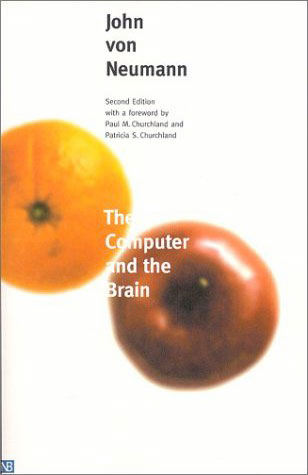
One of the greatest intellectuals of our century writes about computing systems and fundamental aspects of the brain. What’s there not to like here? I’m only halfway through the book, and it’s already got so much worthy material in it that I will recommend it to any other computing folks. It’s worth it for the Foreword alone.
Alas, von Neumann passed on a while ago. Right after our discussion, I find out that John Backus passed away last Saturday. Phil Windley comments that “Computer Science has always been a discipline where the founders were still around. That’s changing.”
Arguably computing’s most famous face-person right now is Bill Gates. I don’t see Gates being famous as bad: after all, the guy is a multi-billionaire, which naturally gives him a little bit of a reputation, and his philanthropic acts are to be admired even if one despises his business tactics. However, what does the greater public know about our real heroes? Alan Turing? John von Neumann? Grace Hopper? Alan Kay? John Backus? Donald Knuth? Edsgar Dijkstra? Doug Engelbart?
I remember when John Shepherd taught me CS2041 at university, he spent 5 minutes at the start of each lecture talking about “famous geeks” and what they did for our industry. We need to educate ourselves as an industry and learn and respect what these folks did; go back to our roots; respect our elders. I’d wager that a lot more mathematicians know about Bertrand Russell and Leonhard Euler than self-described programmers and computing geeks know about Alan Turing and Edsgar Dijkstra.
If you’re a programmer (or even if you’re not), go to Wikipedia’s list of Turing Award winners sometime and just start reading about people you don’t know, starting with the man who the Turing award’s named after. (I’m ashamed to say that I only recognise a mere 22 out of 51 names of the Turing Award winners, and I’m scared to think that I’m probably doing a lot better than a lot of other folks.)
I understand that people such as Knuth and Dijkstra made specialised contributions to our field, and that the greater public won’t particularly care for them (in the same way that a lot of the general public won’t know about Bertrand Russell or even Euler, but they’re known by pretty much every single mathematician). However, there are lots of computing legends who we can talk about at dinner with all our non-geek friends and family. Go get Doug Engelbart’s Mother of All Demos or Ivan Sutherland’s Sketchpad demo and show it to your friends. Tell your family about the role that Turing played in World War II, and the amusing story of Grace Hopper finding an actual bug inside her computer.
As Dijkstra said, “in their capacity as a tool, computers will be but a ripple on the surface of our culture. In their capacity as intellectual challenge, they are without precedent in the cultural history of mankind.” Computing is one of the most important things to emerge from this entire century. I hope that in twenty years’ time, at least Alan Turing will be a household name alongside Bill Gates. Let’s do our part to contribute to that.
-
Computing Heroes
I was chatting to a mate of mine about a remarkable book that I found the other day:
One of the greatest intellectuals of our century writes about computing systems and fundamental aspects of the brain. What’s there not to like here? I’m only halfway through the book, and it’s already got so much worthy material in it that I will recommend it to any other computing folks. It’s worth it for the Foreword alone.
Alas, von Neumann passed on a while ago. Right after our discussion, I find out that John Backus passed away last Saturday. Phil Windley comments that “Computer Science has always been a discipline where the founders were still around. That’s changing.”
Arguably computing’s most famous face-person right now is Bill Gates. I don’t see Gates being famous as bad: after all, the guy is a multi-billionaire, which naturally gives him a little bit of a reputation, and his philanthropic acts are to be admired even if one despises his business tactics. However, what does the greater public know about our real heroes? Alan Turing? John von Neumann? Grace Hopper? Alan Kay? John Backus? Donald Knuth? Edsgar Dijkstra? Doug Engelbart?
I remember when John Shepherd taught me CS2041 at university, he spent 5 minutes at the start of each lecture talking about “famous geeks” and what they did for our industry. We need to educate ourselves as an industry and learn and respect what these folks did; go back to our roots; respect our elders. I’d wager that a lot more mathematicians know about Bertrand Russell and Leonhard Euler than self-described programmers and computing geeks know about Alan Turing and Edsgar Dijkstra.
If you’re a programmer (or even if you’re not), go to Wikipedia’s list of Turing Award winners sometime and just start reading about people you don’t know, starting with the man who the Turing award’s named after. (I’m ashamed to say that I only recognise a mere 22 out of 51 names of the Turing Award winners, and I’m scared to think that I’m probably doing a lot better than a lot of other folks.)
I understand that people such as Knuth and Dijkstra made specialised contributions to our field, and that the greater public won’t particularly care for them (in the same way that a lot of the general public won’t know about Bertrand Russell or even Euler, but they’re known by pretty much every single mathematician). However, there are lots of computing legends who we can talk about at dinner with all our non-geek friends and family. Go get Doug Engelbart’s Mother of All Demos or Ivan Sutherland’s Sketchpad demo and show it to your friends. Tell your family about the role that Turing played in World War II, and the amusing story of Grace Hopper finding an actual bug inside her computer.
As Dijkstra said, “in their capacity as a tool, computers will be but a ripple on the surface of our culture. In their capacity as intellectual challenge, they are without precedent in the cultural history of mankind.” Computing is one of the most important things to emerge from this entire century. I hope that in twenty years’ time, at least Alan Turing will be a household name alongside Bill Gates. Let’s do our part to contribute to that.
-
Objective-C Accessors
I like Objective-C. It’s a nice language. However, having to write accessor methods all day is boring, error-prone, and a pain in the ass:
- (NSFoo*) foo{ return foo;}- (void) setFoo:(NSFoo* newFoo){ [foo autorelease]; foo = [newFoo retain];}I mean, c’mon. This is Objective-C we’re talking about, not Java or C . However, until Objective-C 2.0’s property support hits the streets (which, unfortunately, will only be supported on Mac OS X 10.5 and later as far as I know), you really have to write these dumb-ass accessors to, well, access properties in your objects correctly. You don’t need to write accessors thanks to the magic of Cocoa’s Key-Value Coding, but it just feels wrong to access instance variables using strings as keys. I mean, ugh—one typo in the string and you’ve got yourself a problem. Death to dynamic typing when it’s totally unnecessary.
As such, I got totally fed up with this and wrote a little script to generate accessor methods. I’m normally not a fan of code generation, but in this case, the code generation’s actually designed to be one-shot, and it doesn’t alter the ever-picky build process. It’s meant to be used in Xcode, although you can run it via the commandline too if you like.
Given the following input:
int integerThing;NSString* _stringThing;IBOutlet NSWindow* window;It will spit out the following:
#pragma mark Accessors- (int) integerThing;- (void) setIntegerThing:(int)anIntegerThing;- (NSString*) stringThing;- (void) setStringThing:(NSString*)aStringThing;- (NSWindow*) window;- (void) setWindow:(NSWindow*)aWindow;%%%{PBXSelection}%%%#pragma mark Accessors- (int) integerThing{ return integerThing;}- (void) setIntegerThing:(int)anIntegerThing{ integerThing = anIntegerThing;}- (NSString*) stringThing{ return _stringThing;}- (void) setStringThing:(NSString*)aStringThing{ [_stringThing autorelease]; _stringThing = [aStringThing copy];}- (NSWindow*) window{ return window;}- (void) setWindow:(NSWindow*)aWindow{ [window autorelease]; window = [aWindow retain];}There’s a couple of dandy features in the script that I find useful, all of which are demonstrated in the above output:
- It will detect whether your instance variables start with a vowel, and write out
anIntegerinstead ofaIntegeras the parameter names for the methods. - It will
copyrather thanretainvalue classes such as NSStrings and NSNumbers, as God intended. - For all you gumbies who prefix your instance variables with a leading underscore, it will correctly recognise that and not prefix your accessor methods with an underscore.1
- IBOutlet and a few other type qualifiers (
__weak,__strong,volatileetc) are ignored correctly. - It will emit Xcode-specific
#pragma markplaces to make the method navigator control a little more useful. - It will emit Xcode-specific
%%%{PBXSelection}%%%markers so that the accessor methods meant to go into your.mimplementation file are automatically selected, ready for a cut-and-paste.
Download the
mkdir -p ~/Library/"Application Support"/Apple/Developer Tools/Scripts/10-Scriptsln -sf "/Library/Application Support/Apple/Developer Tools/Scripts/10-User Scripts/99-resetMenu.sh" ~/Library/"Application Support"/Apple/Developer Tools/Scripts/10-Scripts/cp ~/Desktop/objc-make-accessors ~/Library/"Application Support"/Apple/Developer Tools/Scripts/10-Scripts/objc-make-accessorsscript and throw it into your “~/Library/Application Support/Apple/Developer Tools/Scripts” folder. If you don’t have one yet:Done. You should now have a Scripts menu in Xcode with a new menu item named “IVars to Accessor Methods”. Have fun.
1 Note that older versions of the Cocoa Coding Guidelines specified that prefixing instance variables with underscores is an Apple-only convention and you should not do this in your own classes. Now the guidelines just don’t mention anything about this issue, but I still dislike it because putting underscores every time you access an instance variable really lowers code readability.
- It will detect whether your instance variables start with a vowel, and write out
-
Objective-C Accessors
I like Objective-C. It’s a nice language. However, having to write accessor methods all day is boring, error-prone, and a pain in the ass:
- (NSFoo*) foo{ return foo;}- (void) setFoo:(NSFoo* newFoo){ [foo autorelease]; foo = [newFoo retain];}I mean, c’mon. This is Objective-C we’re talking about, not Java or C . However, until Objective-C 2.0’s property support hits the streets (which, unfortunately, will only be supported on Mac OS X 10.5 and later as far as I know), you really have to write these dumb-ass accessors to, well, access properties in your objects correctly. You don’t need to write accessors thanks to the magic of Cocoa’s Key-Value Coding, but it just feels wrong to access instance variables using strings as keys. I mean, ugh—one typo in the string and you’ve got yourself a problem. Death to dynamic typing when it’s totally unnecessary.
As such, I got totally fed up with this and wrote a little script to generate accessor methods. I’m normally not a fan of code generation, but in this case, the code generation’s actually designed to be one-shot, and it doesn’t alter the ever-picky build process. It’s meant to be used in Xcode, although you can run it via the commandline too if you like.
Given the following input:
int integerThing;NSString* _stringThing;IBOutlet NSWindow* window;It will spit out the following:
#pragma mark Accessors- (int) integerThing;- (void) setIntegerThing:(int)anIntegerThing;- (NSString*) stringThing;- (void) setStringThing:(NSString*)aStringThing;- (NSWindow*) window;- (void) setWindow:(NSWindow*)aWindow;%%%{PBXSelection}%%%#pragma mark Accessors- (int) integerThing{ return integerThing;}- (void) setIntegerThing:(int)anIntegerThing{ integerThing = anIntegerThing;}- (NSString*) stringThing{ return _stringThing;}- (void) setStringThing:(NSString*)aStringThing{ [_stringThing autorelease]; _stringThing = [aStringThing copy];}- (NSWindow*) window{ return window;}- (void) setWindow:(NSWindow*)aWindow{ [window autorelease]; window = [aWindow retain];}There’s a couple of dandy features in the script that I find useful, all of which are demonstrated in the above output:
- It will detect whether your instance variables start with a vowel, and write out
anIntegerinstead ofaIntegeras the parameter names for the methods. - It will
copyrather thanretainvalue classes such as NSStrings and NSNumbers, as God intended. - For all you gumbies who prefix your instance variables with a leading underscore, it will correctly recognise that and not prefix your accessor methods with an underscore.1
- IBOutlet and a few other type qualifiers (
__weak,__strong,volatileetc) are ignored correctly. - It will emit Xcode-specific
#pragma markplaces to make the method navigator control a little more useful. - It will emit Xcode-specific
%%%{PBXSelection}%%%markers so that the accessor methods meant to go into your.mimplementation file are automatically selected, ready for a cut-and-paste.
Download the
mkdir -p ~/Library/"Application Support"/Apple/Developer Tools/Scripts/10-Scriptsln -sf "/Library/Application Support/Apple/Developer Tools/Scripts/10-User Scripts/99-resetMenu.sh" ~/Library/"Application Support"/Apple/Developer Tools/Scripts/10-Scripts/cp ~/Desktop/objc-make-accessors ~/Library/"Application Support"/Apple/Developer Tools/Scripts/10-Scripts/objc-make-accessorsscript and throw it into your “~/Library/Application Support/Apple/Developer Tools/Scripts” folder. If you don’t have one yet:Done. You should now have a Scripts menu in Xcode with a new menu item named “IVars to Accessor Methods”. Have fun.
1 Note that older versions of the Cocoa Coding Guidelines specified that prefixing instance variables with underscores is an Apple-only convention and you should not do this in your own classes. Now the guidelines just don’t mention anything about this issue, but I still dislike it because putting underscores every time you access an instance variable really lowers code readability.
- It will detect whether your instance variables start with a vowel, and write out
-
Cocoa Users Group in Sydney
To all the Mac users out there: would you be interested in a Cocoa Users’ Group in Sydney? If so, please drop me an email—my address is at the bottom of the page—and if there’s enough numbers, perhaps we can organise something. The idea’s to have a local forum for
geekupsmeetups, random presentations, mailing lists, and all that sort of fun stuff.Oh yeah, and please also let me know your self-described level of expertise: none, novice, intermediate, expert.
(For those who closely track the Cocoa scene in Australia: yep, this is the same call for interest that Duncan Campbell has initiated.)